A visual guide · Thessley Passkey
Your phone signs. The service decides.
A Thessley approval is a short-lived, one-time request. Your phone signs the decision with its enrolled private key; the website or computer verifies that signature before continuing the login.
The Android app
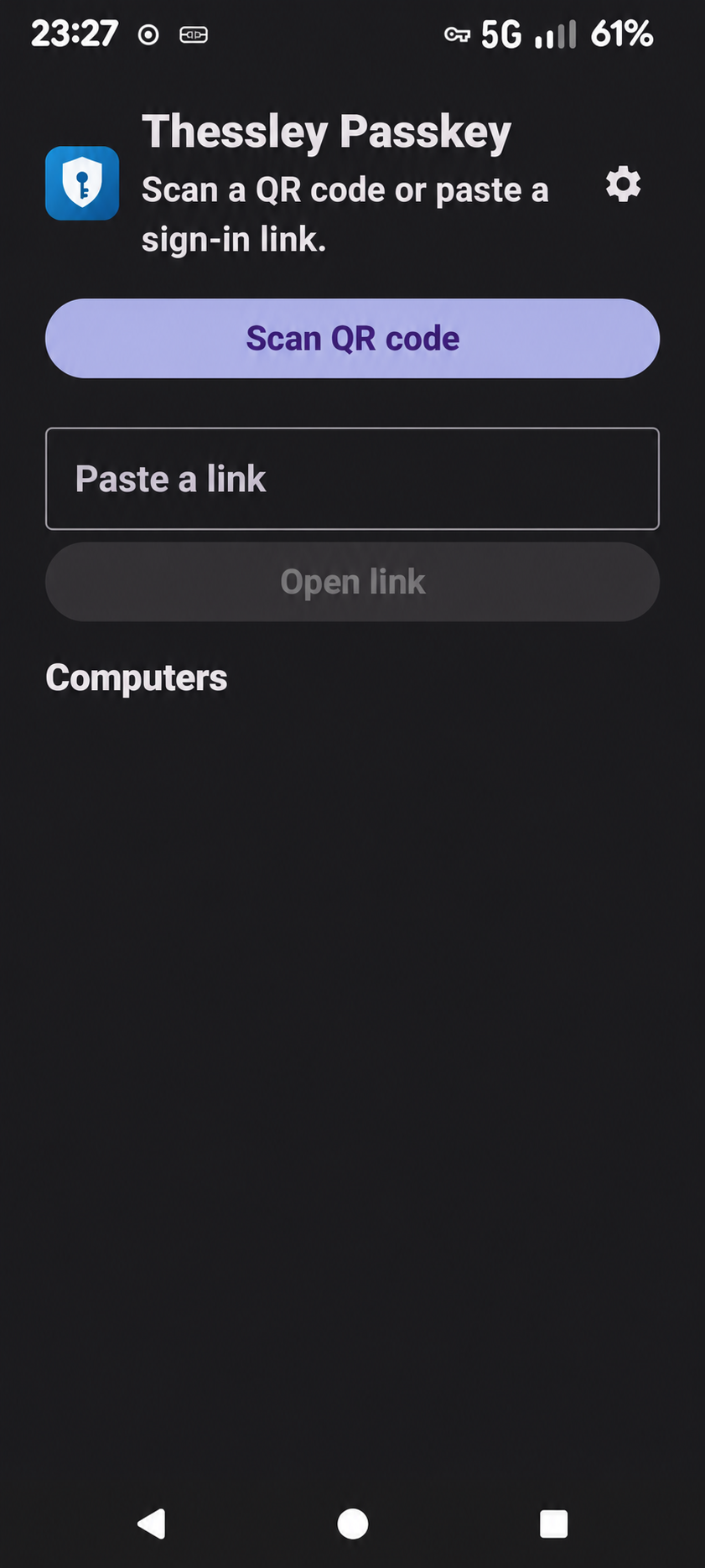
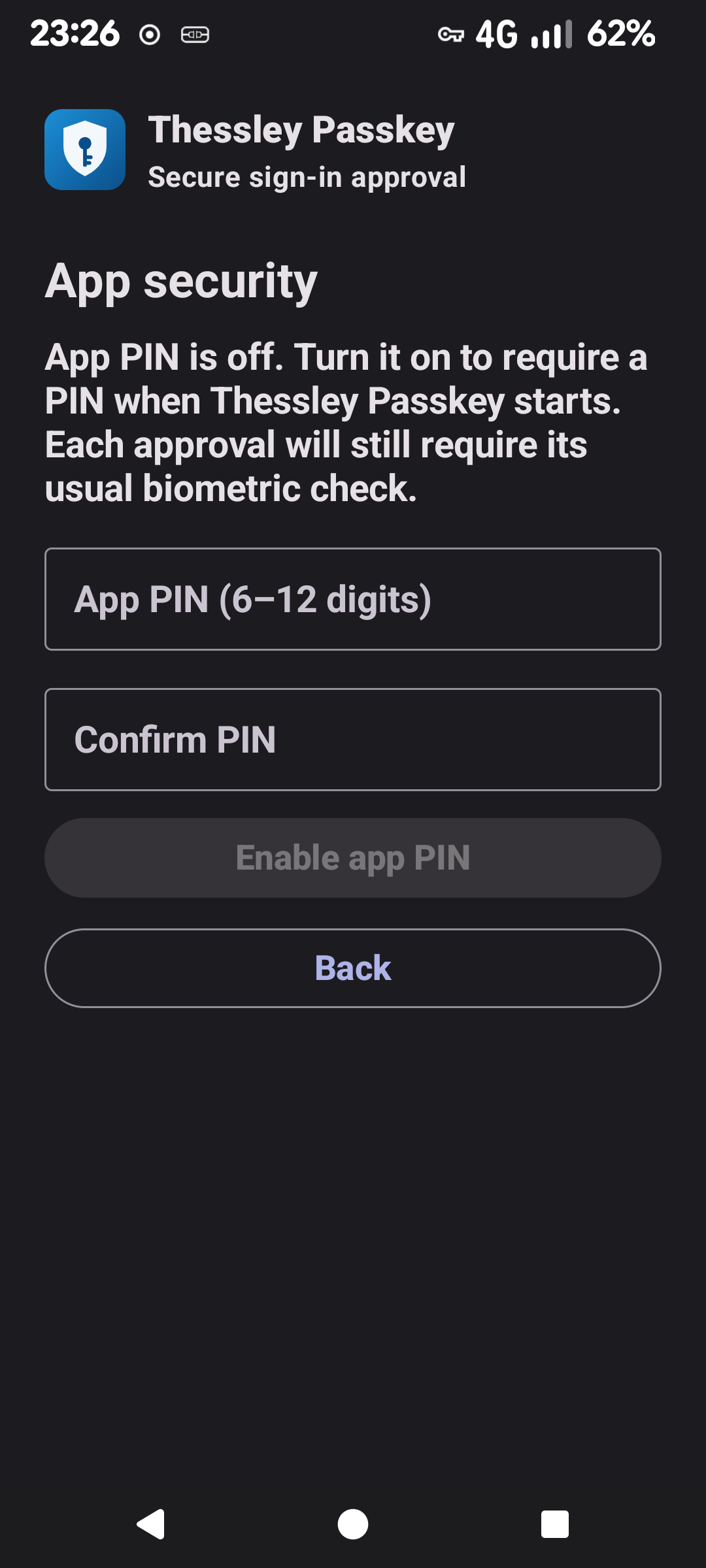
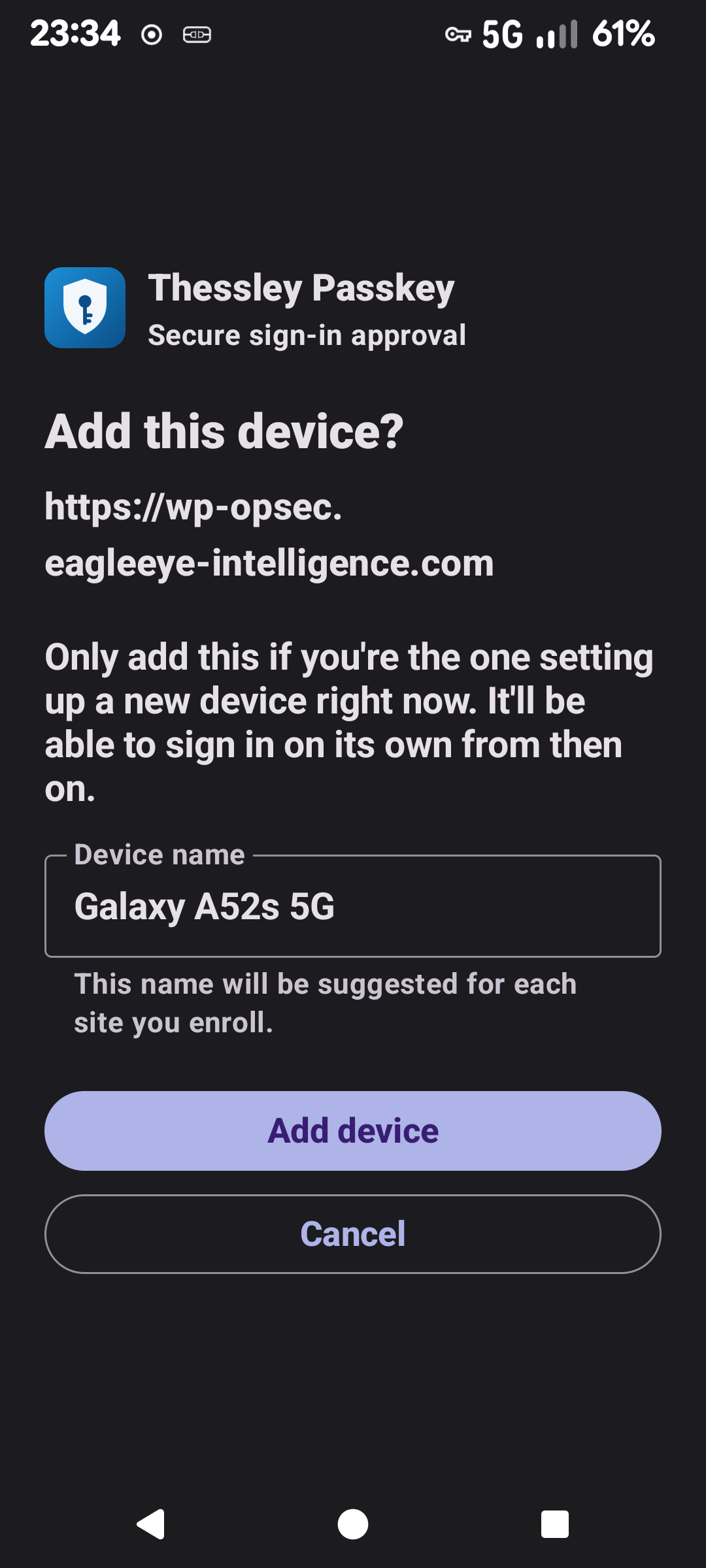
What the user sees
Screens captured from the Thessley Passkey app on a connected Android phone. The home screenshot has the enrolled device list removed for privacy.
The idea
QR carries a request, never the key
The computer or website creates a request and displays a QR code or app link. The phone reads enough information to identify that request, asks you to approve or deny, then returns a signed answer.
Private signing key
Used to sign an exact message for one request. It is not sent to the computer or website.
Public verification key
Registered to the account or computer. It lets the service check signatures without learning the private key.
Request coordinates
Request ID, nonce, service information and context needed for the app to find and describe the pending request.
Before first use
Enrollment connects a phone key to an account
The service stores a public key and associates it with the intended user or computer. A matching code or proof-of-possession step helps confirm that the key being enrolled belongs to the phone in front of you.
Key protection varies by device. The Android app uses Android Keystore. Some devices can protect a key in secure hardware; software-backed keys are also possible. A device’s displayed attestation level is separate evidence and should not be assumed from a successful signature alone.
Key protection
Where does the private key live?
The app asks Android Keystore to create and use the phone’s signing key. Keystore is the API; the device may back that key with software, a TEE, or StrongBox. The service receives the public key and may receive attestation evidence during enrollment—not the private key.
Key operation in software
The key is managed through Keystore, but the reported security level is software. It does not claim isolation by a TEE or StrongBox.
Trusted Execution Environment
A hardware-isolated secure environment, often called the secure world. The key operation is protected from the normal Android environment.
Separate secure hardware
A dedicated secure component with stronger isolation than the regular TEE path. Only some devices provide it, and it can be slower.
A different kind of hardware root
The Thessley desktop client can use a TPM chip. The site’s optional proof checks a manufacturer certificate, activates a fresh attestation key, and verifies that the signing key is fixed to that TPM.
Attestation is evidence about key storage, not the login signature. Normal approval proves that the enrolled key signed this request. Attestation is a separate enrollment-time claim about where that key was generated and protected. TPM means Trusted Platform Module; it is distinct from an Android TEE.
Two security levels
attestationSecurityLevel says where the attestation was produced. keymasterSecurityLevel says where the signing key is managed. They are separate fields and can differ.
It does not yet establish key residency
The module checks the Google certificate chain, enrollment challenge, and match to the registered key, but records only attestationSecurityLevel; it does not read keymasterSecurityLevel. Its displayed level therefore does not confirm where the signing key lives. Attestation is log-only, enrollment is not blocked, and the verifier has not been validated on real devices.
Parsed, but not trusted
These pages can display both Android levels, including keymasterSecurityLevel, but they do not validate the Android certificate chain against a trusted root. Treat the displayed phone level there as unverified information.
Verified only after proof
The optional TPM flow checks the manufacturer chain and key certification. It is limited to supported TPMs and maker roots; a missing or failed proof does not block enrollment. Revocation lists and firmware security are not checked.
The desktop hardware module is TPM 2.0 (Trusted Platform Module), separate from Android’s TEE (Trusted Execution Environment).
One approval
Fresh challenge → user choice → verified signature
Unique and short-lived
The service creates a request ID and random nonce, records the pending state, and presents a QR or app link.
Review the prompt
The app shows the service and request context available to that flow. The user chooses approve or deny and unlocks signing.
Server decides
The service checks the enrolled key, signature, timestamp, nonce, request state, and account or machine binding before access proceeds.
What is signed
Two related protocols, separated by design
The phone signs a deterministic, pipe-separated message—not arbitrary JSON. The fixed version prefix keeps a website signature from being accepted as a computer-login signature.
thessley_passkey_v1
It binds the response to the site’s origin, request ID, nonce, type, timestamp, and action.
thessley_pam_v1
It binds the response to the computer identity and the account being approved.
Signature format: ECDSA over SHA-256 using an EC P-256 public key. The server verifies the signature with the enrolled public key and allows only a small clock skew (60 seconds in the implementation).
Where it runs
One phone app, different enforcement points
WordPress / Drupal
The browser starts a request and displays the QR. The site polls for a result; only the browser that started the request receives the authenticated session.
PAM gate
PAM pauses the protected action while a concurrent approval listener routes the phone’s signed answer to that request. SSH and sudo integrations can use this protocol family.
OpenSSH gate
Windows OpenSSH first checks the configured password or key. A forced command then waits for Thessley phone approval before starting the shell or command.
Certificate + phone
OpenVPN checks a per-device client certificate and requests a phone approval. Each connection or reconnect needs a fresh approval in this setup.
Same cryptographic idea; different access-control hook. The Windows gate runs after OpenSSH’s first factor, while Linux PAM can sit inside the login decision. The VPN also requires its client certificate.
Implementation guide
Build a QR login provider
A QR renderer is only the handoff. Your provider must create and track a one-time login request, let the enrolled Thessley app fetch its details and submit a signed decision, verify that signature, and then complete the original browser session. The examples below show the website protocol; computer/PAM approvals use a different signed message.
Issue a pending request
Generate an unpredictable request ID and nonce, store them with a short expiry and the browser session binding, and choose the exact HTTPS origin on the server.
Show a QR or app link
Encode thessleypasskey://auth?type=login&id=…&nonce=…&origin=…. QR libraries in Python, PHP, and JavaScript can encode this URI; the URI carries no private key.
Accept the app’s signed result
Expose compatible request/status/respond endpoints for the app. Store the response only after checking the request, account, action, timestamp, and signature.
Consume once, then sign in
Atomically mark the request used and authenticate only the browser session that created it. Never let a polling endpoint alone grant access.
Enrollment: register a phone before login
Each site origin needs its own enrolled phone credential. Start enrollment only from an authenticated account session, with CSRF protection; create a short-lived enroll request bound to that account; and show thessleypasskey://auth?type=enroll&id=…&nonce=…&origin=…. The phone generates a new P-256 key pair and asks the user to confirm the site and account. It sends the Base64 DER/SPKI public key, a label, timestamp, and a proof signed by the new private key. Verify that proof against the submitted public key before storing that key for the account that started enrollment.
Canonical message: thessley_passkey_v1|enroll|request_id|origin|nonce|timestamp|register. It uses the same ECDSA P-256 / SHA-256 signature format. The proof shows possession of the new private key; it does not prove the key is hardware-backed. Keep the authenticated session, account binding, CSRF check, short expiry, rate limit, and one-time request consumption in your provider.
Login uses POST /thessley/v1/passkey/login/start, then GET /thessley/v1/passkey/login/{id}/status and POST /thessley/v1/passkey/login/{id}/respond. Enrollment uses authenticated, CSRF-protected POST /thessley/v1/passkey/enroll/start, GET /thessley/v1/passkey/enroll/{id}/status, and POST /thessley/v1/passkey/enroll/{id}/respond. Enrollment response fields include public_key, algorithm, label, timestamp, and proof_signature. Keep the /thessley/v1/passkey prefix and match the Android client’s exact JSON contract. The signed origin must be the canonical HTTPS origin configured by the server.
Create the app link in three languages
Use a cryptographically secure random nonce and an unpredictable request ID. URL-encode every query value. Pass the resulting string to any QR encoder; never put a password, private key, or long-lived bearer token in the QR.
Python
import secrets
from urllib.parse import urlencode

request_id = secrets.token_urlsafe(24)
nonce = secrets.token_urlsafe(32)
origin = "https://login.example.com"  # fixed server configuration
app_link = "thessleypasskey://auth?" + urlencode({
    "type": "login", "id": request_id, "nonce": nonce, "origin": origin
})
PHP
<?php
$requestId = rtrim(strtr(base64_encode(random_bytes(24)), '+/', '-_'), '=');
$nonce = rtrim(strtr(base64_encode(random_bytes(32)), '+/', '-_'), '=');
$origin = 'https://login.example.com'; // fixed server configuration
$appLink = 'thessleypasskey://auth?' . http_build_query([
    'type' => 'login', 'id' => $requestId, 'nonce' => $nonce, 'origin' => $origin,
]);
Node.js
const { randomBytes } = require('node:crypto');
const query = new URLSearchParams({
  type: 'login',
  id: randomBytes(24).toString('base64url'),
  nonce: randomBytes(32).toString('base64url'),
  origin: 'https://login.example.com' // fixed server configuration
});
const appLink = `thessleypasskey://auth?${query}`;
Canonical website message (exact UTF-8 bytes): thessley_passkey_v1|type|request_id|origin|nonce|timestamp|action. The app returns a Base64 DER ECDSA signature made with P-256 and SHA-256. Look up the public key by the enrolled credential_id; do not trust a key supplied with the approval. For PAM/computer requests, the signed form is thessley_pam_v1|type|request_id|machine_id|username|nonce|timestamp|action.
Python · verify a website response
Requires Python’s cryptography package. This helper checks the signed fields and freshness; your route must also check pending state, account ownership, expected origin, and one-time consumption.
import base64
import time
from cryptography.hazmat.primitives import hashes, serialization
from cryptography.hazmat.primitives.asymmetric import ec
from cryptography.exceptions import InvalidSignature

def verify_website_response(public_key_pem, response, expected_origin):
    fields = [response[k] for k in ("type", "request_id", "origin", "nonce", "timestamp", "action")]
    if response["origin"] != expected_origin or response["action"] not in {"approve", "deny"}:
        return False
    if any("|" in str(value) for value in fields):
        return False
    timestamp = int(response["timestamp"])
    if abs(int(time.time()) - timestamp) > 60:
        return False
    message = "thessley_passkey_v1|" + "|".join(map(str, fields))
    key = serialization.load_pem_public_key(public_key_pem)
    if not isinstance(key, ec.EllipticCurvePublicKey) or not isinstance(key.curve, ec.SECP256R1):
        return False
    signature = base64.b64decode(response["signature"], validate=True)
    try:
        key.verify(signature, message.encode("utf-8"), ec.ECDSA(hashes.SHA256()))
        return True
    except (InvalidSignature, ValueError, TypeError):
        return False
PHP · verify the same signed message
$publicKeyPem must come from the trusted enrolled-key record. For an SPKI public key stored as Base64 DER, wrap the decoded DER in a PEM PUBLIC KEY block first.
<?php
function verifyWebsiteResponse(array $r, string $publicKeyPem, string $expectedOrigin): bool {
    $keys = ['type', 'request_id', 'origin', 'nonce', 'timestamp', 'action'];
    foreach ($keys as $key) {
        if (!isset($r[$key]) || str_contains((string)$r[$key], '|')) return false;
    }
    if ($r['origin'] !== $expectedOrigin || !in_array($r['action'], ['approve', 'deny'], true)) return false;
    if (!ctype_digit((string)$r['timestamp']) || abs(time() - (int)$r['timestamp']) > 60) return false;
    $message = 'thessley_passkey_v1|' . implode('|', array_map(fn($k) => (string)$r[$k], $keys));
    $signature = base64_decode($r['signature'] ?? '', true);
    if ($signature === false) return false;
    return openssl_verify($message, $signature, $publicKeyPem, OPENSSL_ALGO_SHA256) === 1;
}
Node.js · verify with the built-in crypto module
This accepts the enrolled public key as Base64 DER SubjectPublicKeyInfo and the response signature as Base64 DER ECDSA.
const crypto = require('node:crypto');

function verifyWebsiteResponse(r, publicKeySpkiBase64, expectedOrigin) {
  const keys = ['type', 'request_id', 'origin', 'nonce', 'timestamp', 'action'];
  if (keys.some(k => typeof r[k] !== 'string' || r[k].includes('|'))) return false;
  if (r.origin !== expectedOrigin || !['approve', 'deny'].includes(r.action)) return false;
  if (!/^\d+$/.test(r.timestamp) || Math.abs(Date.now() / 1000 - Number(r.timestamp)) > 60) return false;
  const message = 'thessley_passkey_v1|' + keys.map(k => r[k]).join('|');
  try {
    const signature = Buffer.from(r.signature, 'base64');
    if (signature.toString('base64') !== r.signature) return false;
    const key = crypto.createPublicKey({
      key: Buffer.from(publicKeySpkiBase64, 'base64'), format: 'der', type: 'spki'
    });
    return key.asymmetricKeyType === 'ec' &&
      key.asymmetricKeyDetails.namedCurve === 'prime256v1' &&
      crypto.verify('sha256', Buffer.from(message, 'utf8'),
        { key, dsaEncoding: 'der' }, signature);
  } catch { return false; }
}
Production checks every implementation needs: HTTPS; server-owned origin; cryptographically random IDs/nonces; strict expiry and a ±60-second timestamp window; only the expected request type and actions; account and credential ownership checks; signature verification against the already-enrolled key; atomic single-use state transition; browser-session binding; rate limits; key revocation; and careful audit logging. Do not log passwords, private keys, raw approval links, or reusable secrets.
These snippets demonstrate signature verification, not a complete drop-in server. The Thessley app expects the established API and URI formats; a different mobile client needs its own app-link handling and signing implementation.
What the protocol guarantees
Strong checks—and clear limits
Nonce + request state
A signature is tied to a specific pending request. Used, expired, or already-resolved requests are rejected.
Origin or machine/account
Website and computer signatures cover different identifying fields, so approval is scoped to the intended service.
Enrollment and revocation
Only registered public keys are trusted. Removing a device from the service blocks future approvals from that key.
Hardware is not implied
Successful signing proves possession of the key, not by itself that the key is hardware-backed or that the whole phone is uncompromised.
Terminology: Thessley Passkey is an app-level challenge-and-signature approval flow. It is not the browser WebAuthn/FIDO2 login ceremony. Hardware attestation can add evidence for supported devices, but it is optional and distinct from normal signature verification.
Protocol details summarized from the Thessley Passkey website module and the Thessley PAM Linux/Windows implementations. Message fields and access hooks vary by integration; check that integration’s own setup guide before enabling it.